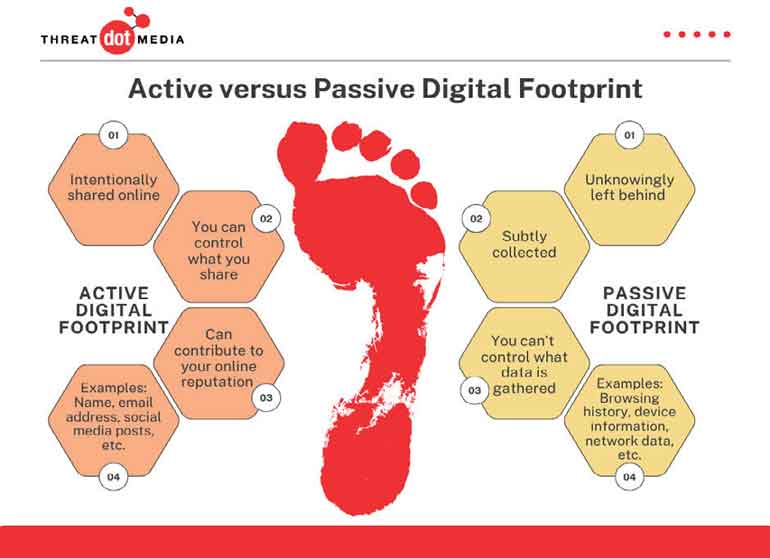
A digital footprint is the collection of data created through an individual’s online activity. This includes search history, social media activity, location tracking, financial transactions, emails, voice recordings, smart device usage, website visits, biometric authentication, and online purchases.
Many people mistakenly believe deleting a post removes it permanently. In reality, data is often archived, cached, replicated, sold, analysed, and stored indefinitely. The future danger lies not only in what is visible today, but in what artificial intelligence may infer tomorrow. AI systems can already analyse behavioral patterns to predict preferences, purchasing habits, emotional responses, political tendencies, health indicators, and financial stability. The digital footprint is becoming a predictive identity system.
Artificial Intelligence and the future of cyber threats
AI-driven threats are among the most dangerous emerging realities. Artificial intelligence is now capable of generating convincing phishing emails that have no spelling errors, mimicking human speech in real time, creating deepfake videos that show people saying things they never said, automating malware development, launching adaptive attacks that change tactics based on defense systems, and identifying behavioral weaknesses in real time.
Deepfake technology is particularly alarming. A scammer can now clone a family member’s voice using just a few seconds of audio from social media, replicate a CEO’s speech to authorise fraudulent transfers, create fake video evidence, manipulate political narratives, or fabricate emergencies ("Mom, I’ve been kidnapped — send money").
This represents the collapse of traditional trust mechanisms. Historically, seeing or hearing something was considered proof. In the AI era, visual and audio evidence may no longer be reliable.
Insider threats:
The enemy within
One of the most overlooked aspects of cybersecurity is the insider threat. Studies indicate that a significant minority of employees believe selling company login credentials is justifiable under financial pressure, dissatisfaction, or personal gain. This highlights a dangerous shift where financial pressure, dissatisfaction, ideology, or greed may drive individuals to compromise systems from within. Organisations often spend millions defending against external hackers while underestimating the risks posed by authorised insiders — from disgruntled IT staff to careless contractors.
The psychological cost of cybercrime
Cybercrime affects more than finances. Victims may experience anxiety, shame, depression, reputational damage, social isolation, blackmail, and identity trauma. Stolen social media credentials are increasingly used for harassment and extortion. Digital identity has become psychologically intertwined with personal identity. Losing control over online presence can feel equivalent to losing control over one’s life narrative.
The future of being permanently connected
Human civilisation is moving toward a hyper-connected future. Emerging technologies include smart homes, wearables, digital currencies, biometric systems, AI assistants, connected vehicles, Internet of Things (IoT) devices, brain-computer interfaces, and smart cities. Every connected device becomes both a convenience tool and a potential surveillance and attack point. The future may bring extraordinary efficiency, but also unprecedented exposure.
The question is no longer "Are we connected?" The real question is: "How much of ourselves are we surrendering through connectivity?"
Cybersecurity as a human discipline
Cybersecurity is often treated as a technical issue, but fundamentally it is a human discipline involving awareness, judgment, ethics, critical thinking, and behavioral discipline. Vigilance remains the first line of defense.
Practical protections include:
- Multi-factor authentication (MFA) – A second verification step beyond a password.
- Strong, unique passwords – Different for every service.
- Verified communication channels – Call back using a known number before sharing information.
- Regular software updates – Patches known security holes.
- Device encryption – Scrambles data so it’s unreadable if the device is stolen.
- VPN usage – Especially on public Wi-Fi.
- Transaction monitoring – Regularly reviewing bank and credit card activity.
- Digital hygiene practices – Logging out of unused accounts, reviewing app permissions, and being skeptical of unexpected requests.
Technology alone cannot solve cyber insecurity if human behavior remains exploitable.
Living connected but protected: A practical survival guide
Since disconnection is not a realistic option, the goal shifts from avoiding the digital world to navigating it with intention and defense. Think of this as digital hygiene — as routine as locking your front door or wearing a seatbelt.
The mindset shift is simple:
Old thinking: "I have nothing worth stealing."
New thinking: "My identity, trust, and access are valuable. I will protect them."
Below are concrete actions organised by difficulty: Basic (everyone can do today), Intermediate (within a week), and Advanced (for professionals and high-risk individuals).
Part 1: Basic defences (Everyone should do these)
A. The three rules of passwords
- Never reuse a password. If one site gets hacked, all your accounts become vulnerable. Use a different password for your email, banking, and social media.
- Make passwords long, not necessarily complex. A phrase like Blue-Coffee-Jumps-Over-Moon-7 is far stronger than P@ssw0rd and easier to remember.
- Use a password manager. Tools like Bitwarden, 1Password, or Apple/Google's built-in managers generate and store strong passwords. You only need to remember one master password.
B. Turn on multi-factor authentication (MFA) everywhere
MFA means you need two things to log in: (1) your password and (2) something you have (like your phone or a physical key). Even if a hacker steals your password, they cannot log in without the second factor.
Priority accounts to protect:
- Primary email (if this is compromised, hackers can reset all your other passwords)
- Banking and payment apps (PayPal, credit cards, Venmo)
- Social media (to prevent impersonation)
- Cloud storage (iCloud, Google Drive, OneDrive)
- Best methods (ranked):
- Authenticator apps (Google Authenticator, Microsoft Authenticator) – Better than SMS.
- Hardware keys (YubiKey) – The strongest.
- SMS codes – Better than nothing, but vulnerable to SIM-swapping.
C. Recognise and pause for social engineering
90% of successful attacks start with a message, call, or email that creates urgency or fear. Train yourself to pause.
- The rule: No legitimate bank, government agency, or company will ever ask for your password, OTP, or PIN via call, text, or email.
- If someone calls claiming to be from your bank: Hang up. Call the number on the back of your card.
- If you receive an urgent email ("Your account will be closed!"): Do not click the link. Go directly to the website by typing the address yourself.
- If a "friend" messages asking for money or a code: Call them directly using a number you already have, not the one in the message.
Part 2: Intermediate defences (Within one week)
D. Lock down your mobile phone
Your phone is your digital identity vault. Treat it accordingly.
- Use biometric + strong PIN: Fingerprint or face ID alone is good, but also set a strong alphanumeric PIN (not 0000 or 1234) as a backup.
- Update your phone and apps immediately when updates are available. Most updates contain security patches for known vulnerabilities.
- Review app permissions monthly. Go to Settings > Apps and check: why does a calculator app need your contacts? Why does a flashlight app need your location? Revoke anything unnecessary.
- Disable previews on lock screen. So that your OTP messages and private notifications are not visible to anyone glancing at your phone.
- Turn on "Find My Device" (iPhone) or "Find My Device" (Android) to remotely lock or wipe a lost phone.
E. Secure your home Wi-Fi and network
- Change the default router password. The default "admin/admin" is a common entry point.
- Enable WPA3 or WPA2 encryption on your router (not WEP or open).
- Create a guest network for visitors and IoT devices (smart bulbs, cameras, voice assistants). Keep your main devices (laptops, phones) on a separate network.
- Turn off WPS (Wi-Fi Protected Setup) – it has known vulnerabilities.
F. Separate work from personal life
If you use a work laptop or phone for personal banking, social media, or browsing, your employer (or anyone who hacks your employer) can potentially access that data.
Whenever possible:
- Use separate devices.
- At minimum, use separate browser profiles or user accounts.
Part 3: Advanced defences (For professionals, high-risk individuals, and organisations)
G. Assume breach mentality
Instead of asking "Am I secure?", ask "If I am breached, how quickly will I detect it and limit the damage?"
Practical steps:
- Monitor your accounts. Set up alerts for every bank transaction.
- Backup critical data offline. Use an external hard drive or USB that is not connected to the internet. Ransomware cannot encrypt what is unplugged.
H. Protect your identity and communications
- Use a VPN (Virtual Private Network) whenever using public Wi-Fi (airports, cafes, hotels). Free VPNs are often dangerous; choose a paid, reputable one (e.g., Mullvad, ProtonVPN).
- Use encrypted messaging for sensitive conversations. Signal or WhatsApp (with end-to-end encryption enabled) are far safer than regular SMS.
- Consider a secondary phone number for banking and OTPs (Google Voice or a cheap prepaid SIM used only for this purpose).
- Opt out of data broker sites like Whitepages, Spokeo, and PeopleFinder. Services like DeleteMe or OneRep can automate this.
I. For organisations (Cybersecurity Implementors)
- Implement zero-trust architecture: Never trust, always verify. Every access request is treated as if it comes from an open network.
- Conduct regular social engineering drills (simulated phishing emails) to train employees without shaming them.
- Enforce MFA for every employee, contractor, and vendor.
- Segment networks so that a breach in marketing cannot reach finance or R&D.
- Maintain an insider threat program – behavioral analytics, exit checklists, and reduced access for departing employees.
- Have an incident response plan that is tested twice a year, not just written once.
Part 4: The most important daily habits (The human firewall)
No tool can replace these three habits:
1.The Pause. Before clicking a link, opening an attachment, or sharing a code, pause for three seconds. Ask: "Was I expecting this? Does this make sense? Is someone creating urgency?"
2.The Separate Channel. If someone calls or emails asking for something sensitive, verify through a completely different channel (call back on a known number, walk to their desk, use a different messaging app).
3.The Weekly Check-in. Spend five minutes every Sunday:
- Review bank and credit card transactions.
- Check app permissions on your phone.
- Install any pending updates.
- Log out of accounts you no longer use.
What if you are already compromised? (Incident Response)
Signs of compromise:
- Unexpected password reset emails
- Login alerts from unknown locations or devices
- Friends receiving spam or strange messages from your accounts
- Unexplained bank transactions
- Your device becomes slow, overheats, or battery drains unusually fast
- Immediate steps:
- Disconnect the device from Wi-Fi and cellular data (airplane mode).
- Change your critical passwords starting with email, then banking, then everything else. Use a clean, uninfected device (like a friend's phone) to do this.
- Enable or re-enable MFA on every account.
- Run a security scan using reputable antivirus (Windows Defender is excellent and built-in; Malwarebytes is a good free option).
- Contact your bank to flag unusual transactions and request new cards.
- Report to your national CERT (e.g., Sri Lanka CERT, US-CERT, or Action Fraud in the UK).
Conclusion: The goal is not invisibility but resilience
You cannot make yourself invisible online, nor should you try. The goal is resilience – the ability to absorb an attempted attack without catastrophic loss.
Think of it like urban living. You cannot eliminate the risk of theft, but you can lock your doors, avoid dark alleys, carry a phone, and know the emergency number. Digital life is the same: you cannot eliminate risk, but you can make yourself a much harder target than the average person.
Most cybercriminals are opportunists. They are looking for the unlocked door, the reused password, the person who clicks without pausing. Do not be that person!
The single most powerful sentence you can learn: "I will verify through another channel."
Say it aloud. Use it every day. It will protect you more than any software.
The greatest cyber threat of the future may not simply be financial theft. It may be the gradual erosion of privacy, autonomy, trust, and human authenticity. Every search query, every location ping, every uploaded image, every voice command, and every digital interaction contributes to a permanent data ecosystem surrounding modern individuals.
What is at stake is not just money. It is the silent extraction of identity.
As humanity becomes increasingly dependent on digital systems, cybersecurity awareness must evolve from an optional technical skill into a fundamental survival literacy for every citizen, professional, and organisation.
(The author is a consultant and multidisciplinary professional engaged in business development and advisory work across several sectors, with a primary focus on hospitality and experiential tourism in Sri Lanka. He also holds qualifications in Electronics and Computer Systems Engineering from the Engineering Council London).

 Cybercrime has become industrialised. The emergence of "Cybercrime-as-a-Service" means even individuals with limited technical knowledge can purchase hacking tools online. The frightening reality is that the average citizen often does not realise they are vulnerable until after the damage has already occurred.